Social Media Instagram Pack - Palette: A Designer's Practical Guide
Let's be honest, maintaining a visually cohesive and engaging Instagram feed can feel like a full-time job. The constant need for fresh, high-quality content that aligns with your brand's aesthetic is a real challenge for creators and businesses alike. This is where a well-considered design asset becomes less of a luxury and more of a strategic necessity. The Social Media Instagram Pack - Palette is one such asset, designed to streamline your workflow and elevate your visual presence without requiring advanced design skills.
Understanding the Palette: More Than Just Pretty Pictures
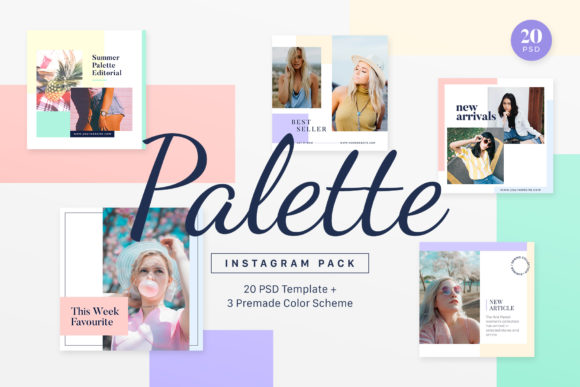
At its core, this Instagram template pack is a collection of 20 meticulously crafted layouts in PSD format. But its true value lies in its clean, sweet, warm, simply and minimalist personality. This isn't a loud or overly decorative set; it's built on principles of modern typography and balanced composition. The style favors ample white space, subtle color accents, and a focus on letting your own imagery—the product photos, lifestyle shots, or personal brand visuals—take center stage. It’s a versatile foundation, much like a reliable serif or sans serif font, that can adapt to various contexts while maintaining a consistent brand identity.
The pack comes with three distinct premade color schemes: Blue & Pink, Purple & Peach, and Tosca & Off White. These aren't random choices. Each palette evokes a different mood—soft and romantic, vibrant and creative, or calm and sophisticated—allowing you to select a starting point that resonates most with your brand's voice. Think of these as curated font pairings, but for color and layout, providing an immediate sense of cohesion and professionalism.
Practical Applications: Where This Template Pack Shines
The versatility of the Social Media Instagram Pack - Palette is one of its strongest points. It’s a practical toolkit for a wide range of users.
- For Fashion & Lifestyle Bloggers: Create a visually stunning grid that tells a story. Use the templates for outfit-of-the-day posts, product flat lays, quote graphics, and promotional announcements. The minimalist layout ensures the focus remains on your content, which is crucial for building a recognizable personal brand.
- For Small Business Owners & Entrepreneurs: Whether you run a boutique, a café, or a consultancy, maintaining a professional social media presence is key. This pack allows you to quickly generate polished graphics for sales, new arrivals, behind-the-scenes looks, and customer testimonials. It’s a cost-effective way to achieve the consistency of a dedicated design team.
- For Marketers and Content Creators: Speed up your content calendar. The drag-and-drop functionality via Smart Objects means you can swap out images and edit text in minutes, not hours. This efficiency is invaluable when managing multiple clients or campaigns, ensuring your social media graphics are always on-brand and high-quality.
Beyond Instagram, the included JPG previews and customizable PSD files can be repurposed for blog graphics, Pinterest pins, or even simple digital flyers. This multi-use potential increases the asset's return on investment significantly.
Maximizing the Asset: Tips for Effective Use
Simply purchasing a design asset is only the first step. Using it effectively is what delivers results. Here’s how to get the most out of this Instagram template pack:
Evaluate the Fit First. Before diving in, review the 20 image previews (JPGs). Do the layouts align with the amount of text you typically use? Do the compositions complement the style of photography you create? A template that fights your natural content will feel forced and be difficult to maintain.
Master the Basics of Customization. The note that editing "contents and backgrounds requires..." is important. While the Smart Objects make image replacement easy, truly making the templates your own means understanding how to adjust the existing elements. This might involve changing the background color to match your brand hex codes, modifying the font style (the pack provides links to the high-quality free fonts used), or tweaking the layout of text boxes. The organized layers are there to make this process intuitive.
Think in Systems, Not Single Posts. The real power of a template pack is in creating a unified visual system. Don't just use one template in isolation. Plan your weekly content using a mix of the 20 layouts. For example, use a quote template on Monday, a product spotlight on Wednesday, and an interactive poll or Q&A template on Friday. This creates rhythm and variety within a cohesive framework, which boosts audience recognition and engagement.
Ultimately, the Social Media Instagram Pack - Palette functions like a set of premium design assets or a well-chosen commercial font. It provides the professional foundation, but your unique content and strategic application are what give it life. It’s a tool to solve the practical problem of consistent, high-quality visual content, freeing you up to focus on what you do best—creating, connecting, and growing your brand.